
Every incident, written up right the first time.

Quick logs, incident reports, risk patterns and employee records. The base every LogEasy property starts with.

We know how it goes.

Something happens on a busy night. The report gets written days later, from memory, and it’s the first thing a lawyer pulls apart.

LogEasy was built inside hotel operations, by people who’ve had to answer for a missing record.

Quick Logs & Incident Reports

Every report filled in right, by whoever was there.

Small things go in a quick log in seconds. Anything serious becomes an incident report, and LogEasy walks your staff through it one question at a time.
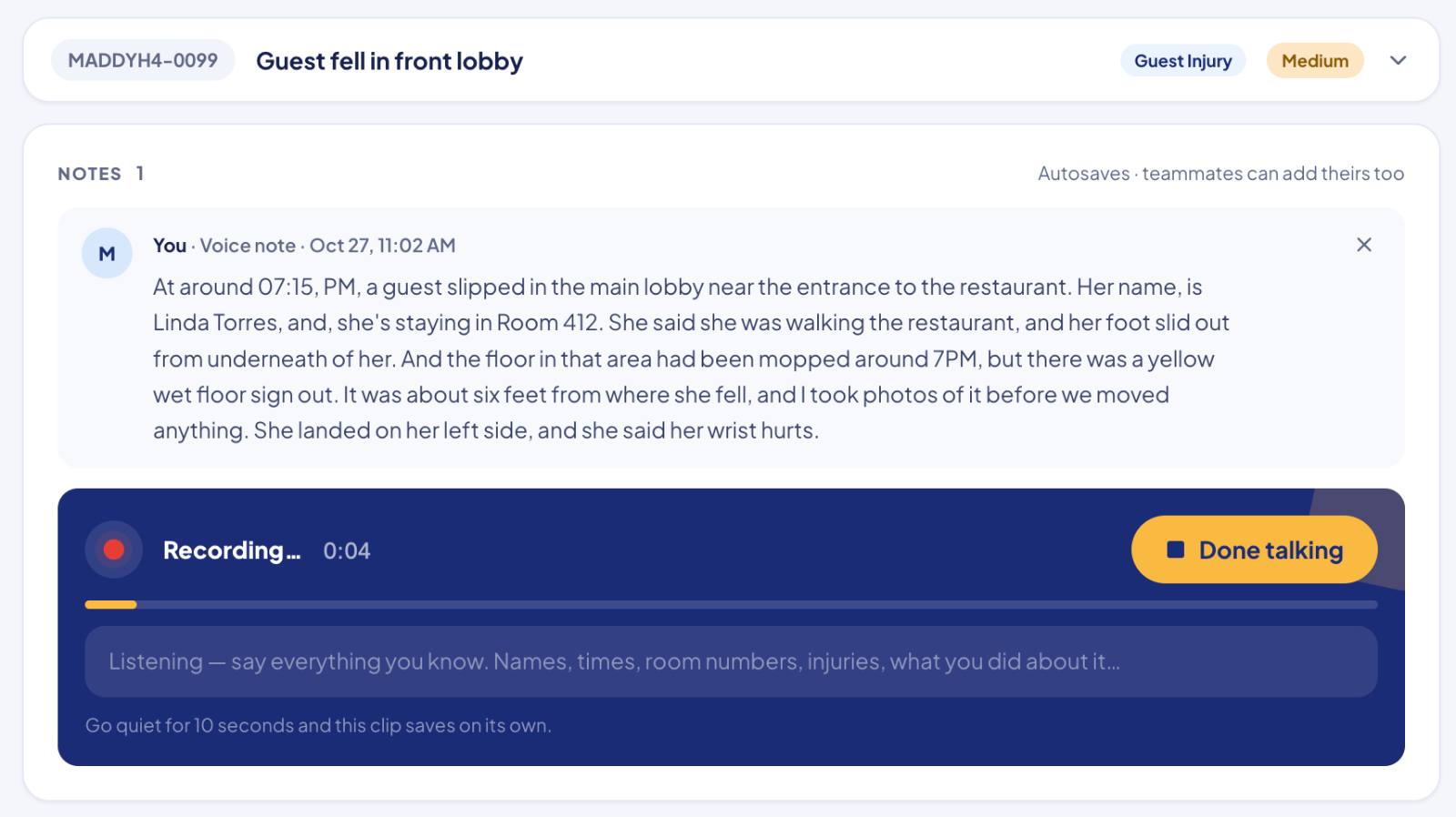
One question at a time
Staff can talk instead of type. Nothing important gets skipped.
Review before it’s final
A manager checks the report before it’s signed.
Saved and time-stamped
Every change is logged and every version is kept.
LogEasy incident report screen

When the lawyer’s letter arrives, the report is already done.

Claims are lost on reports written days later from memory. This one was written that night, by the person who was there.

Statements from everyone involved
Injury details when someone is hurt
Signed PDF ready to send
Incident report #1102
Lobby bar, 23:15
What happened
Guest says he was hit by another guest
Done
People involved
2 guests, 1 bartender
Done
Statements
3 of 3 signed
Done
Saved and time-stamped
Visitors & Banned Individuals

Know who’s on your property, and who shouldn’t be.

Sign visitors in with just a name. If someone on your banned list checks in, your team gets an alert straight away.
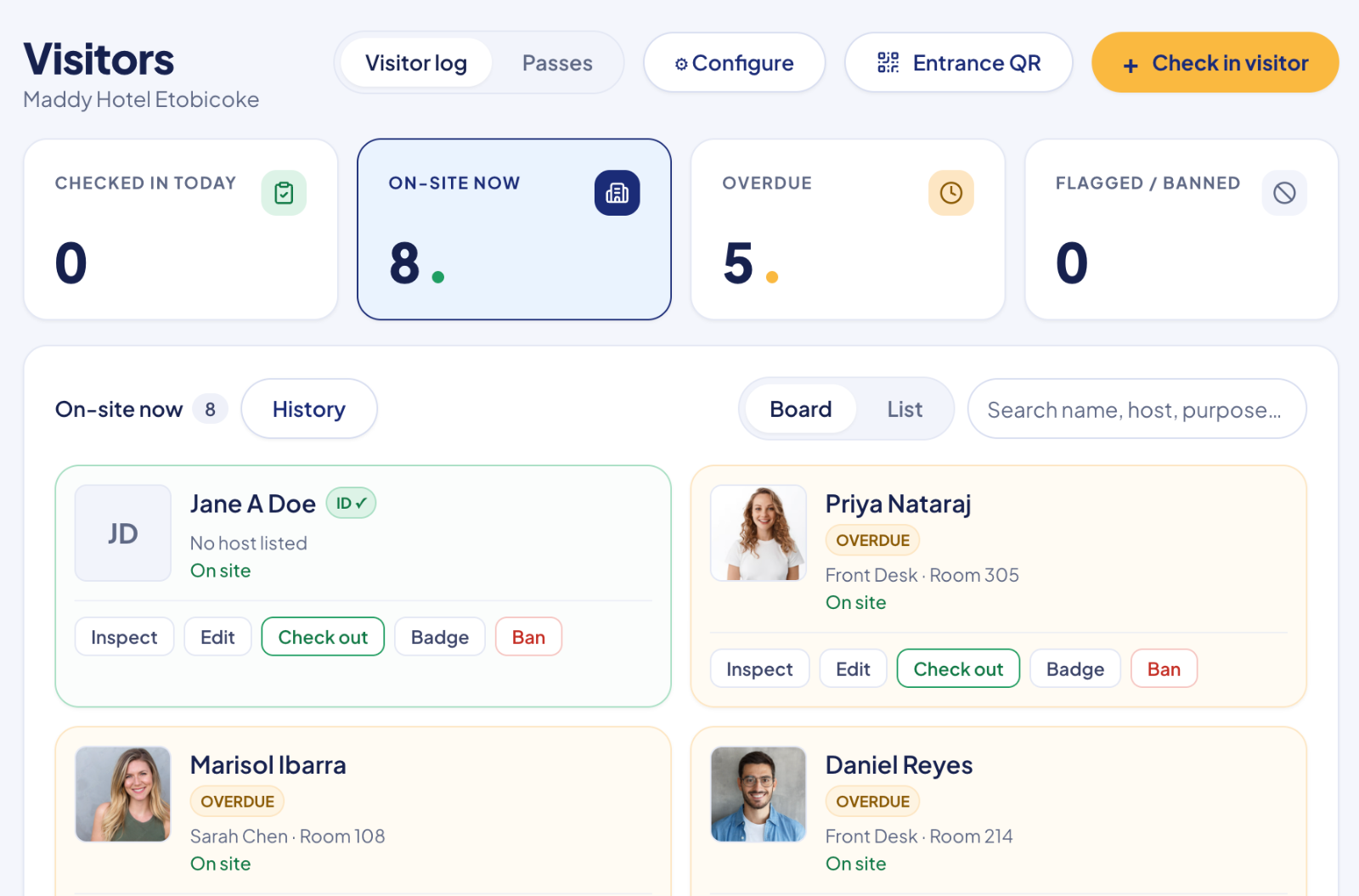
Everyone on site, right now
Who they’re visiting, and when they should leave.
Banned guests flagged at check-in
With a photo, the reason, and what staff should do.
Overdue visitors flagged
Anyone still here past their check-out time shows up.
LogEasy visitors screen

When someone you banned walks back in, the front desk knows.

Bans only work if every shift knows about them. The photo and the reason are on every phone, not on a note in the back office.

Call police, trespass notice, no entry or watch
Bans that end on a set date
Every sighting logged
Banned list match
Front desk, 23:02
Visitor check-in
R. Hale, visiting room 412
Matched
Banned since
Jun 14, fight in lobby bar
Active
Staff should
No entry, log the sighting
Alerted
Saved and time-stamped
Evidence

The proof stays with the report.

Photos, videos, statements and signed forms go straight into the report they belong to. Nothing lives in someone’s camera roll.
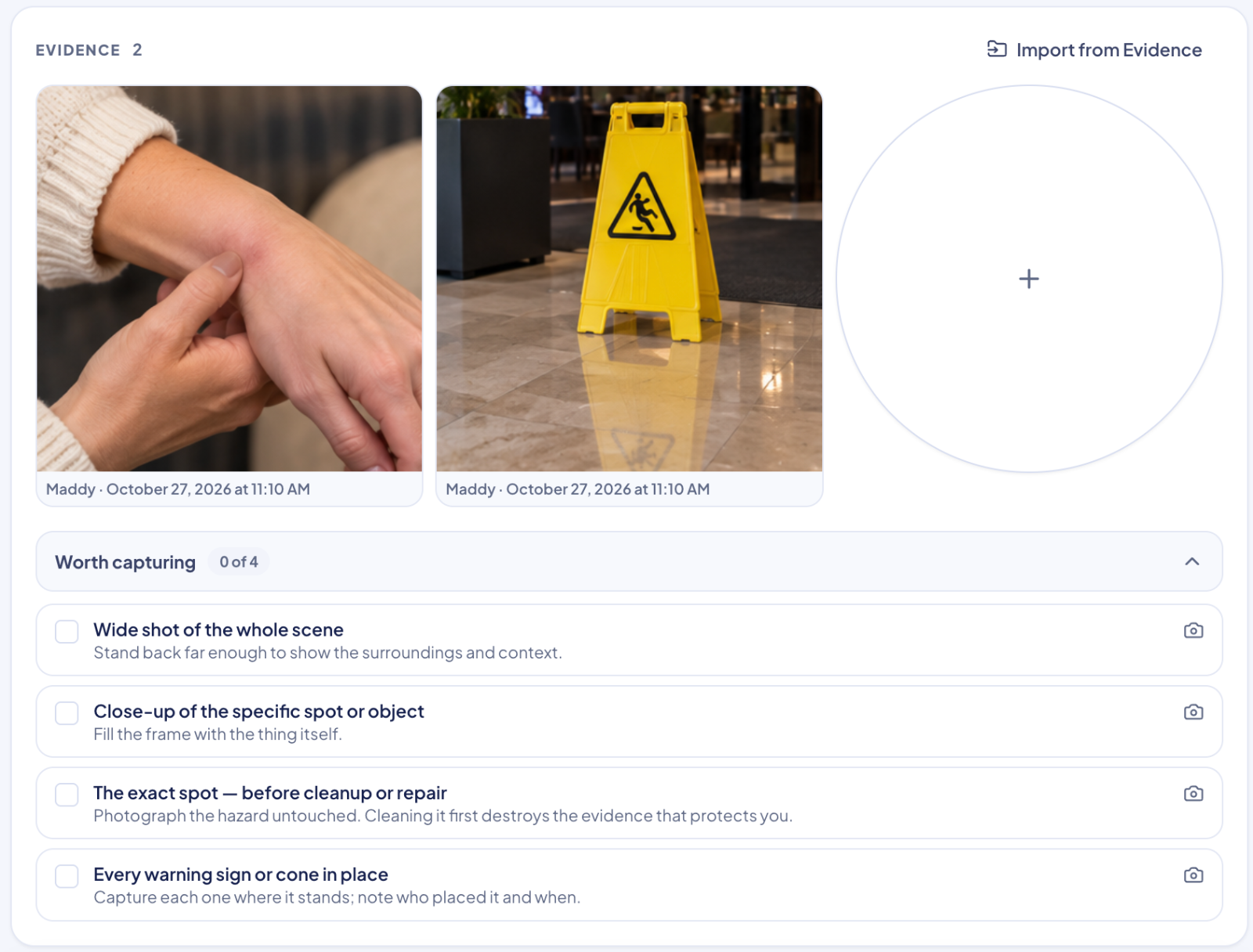
Photos taken in the app
Each one carries the time it was taken.
Forms signed on the spot
Refused medical treatment, guest compensation, injury forms.
Statements in their own language
Witnesses fill in their statement on their own phone, in the language they choose.
LogEasy evidence screen

When a witness doesn’t speak English, you still get their statement.

Send the witness a link. They write or speak their statement on their own phone, in their own language, and it lands in the report.

Talk instead of type
A signed copy emailed to the witness
Attached to the report the moment it’s sent
Evidence
Incident report #1102
Photos
6, taken 23:18 to 23:24
Attached
Bartender statement
Signed 23:40
Attached
Refused medical treatment
Signed by guest
Attached
Saved and time-stamped
Risk Intelligence

See the problems before they turn into claims.

LogEasy reads every report and shows you where and when incidents happen, what they cost, and what’s getting worse.
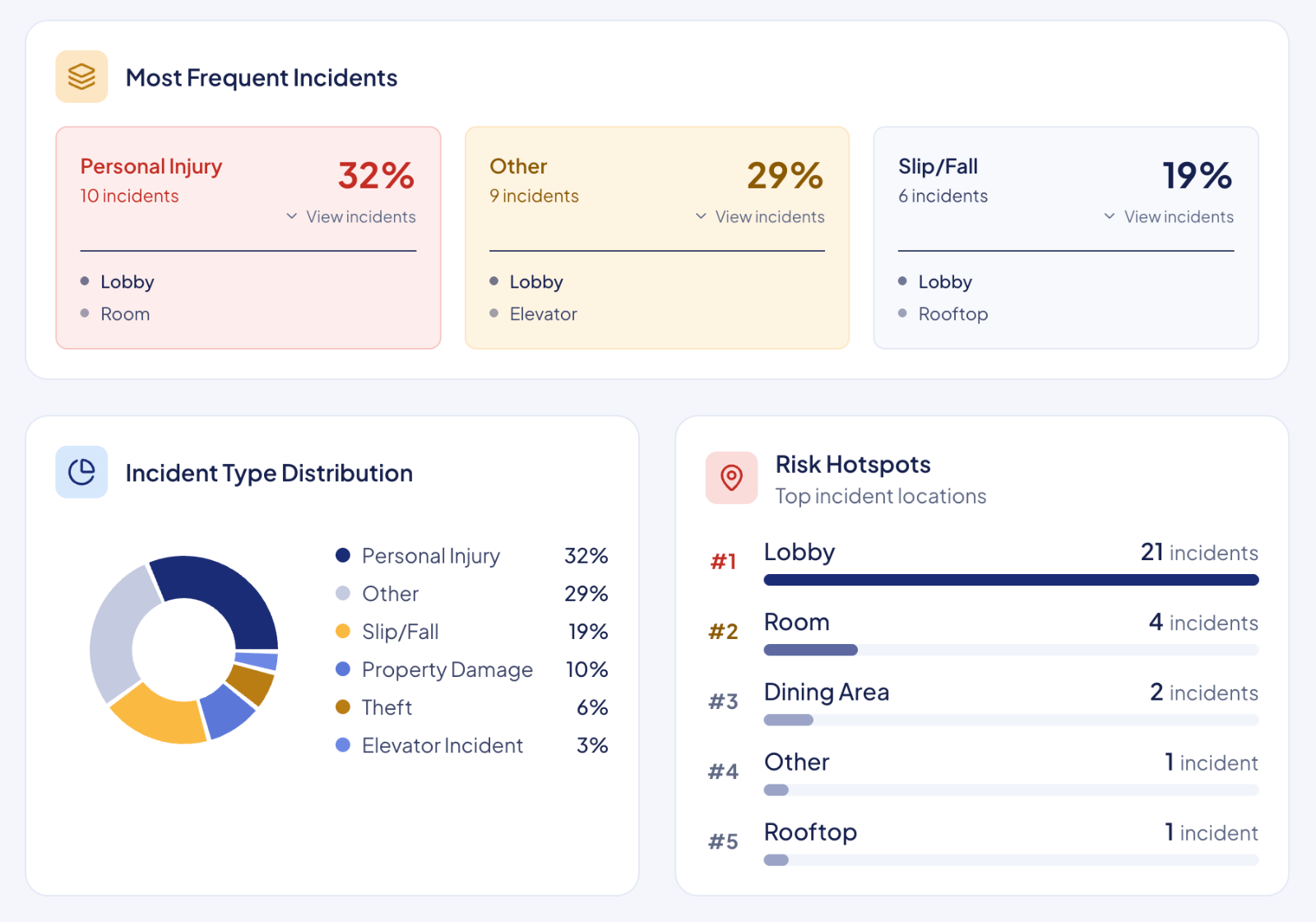
Hotspots
The locations with the most incidents and the highest cost.
Peak times
The hours and days your property is most at risk.
What’s getting worse
Incident types and places trending up, flagged in red.
LogEasy risk intelligence screen

When the same spot keeps showing up, you fix it before the next fall.

Your insurer wants to see you act on patterns. Now you can show them the pattern, and what you did about it.

Built from your own reports
Costs by location and type
Nothing extra for staff to fill in
Pool deck
Last 90 days
Slips and falls
6 reports, up from 2
Rising
Peak time
Saturday, 2 PM to 5 PM
Watch
Action taken
Non-slip mats added Oct 12
Logged
Saved and time-stamped

Every module in the Core App feeds the same record.

A guest says he was hurt in the lobby bar. By the time the lawyer’s letter arrives, the report already has the rest.

Incident report #1102
Guest injury, lobby bar, 23:15
Saved and time-stamped
What happenedGuest says he was hit by another guestIncident reports
Other guestR. Hale, banned Jun 14, flagged at check-in 23:02Visitors
Photos6, taken 23:18 to 23:24Evidence
StatementsBartender and 2 guests, signedEvidence
HistoryThird incident at the lobby bar this monthRisk

Hover or tap a module to see what it adds.

The same night, two ways.

A guest is hurt in the lobby bar at 23:15. Here’s what you have when the claim arrives.

Without LogEasy

✕The report is written two days later, from memory.
✕The photos are on someone’s personal phone.
✕The witness went home and never gave a statement.
✕Nobody knew the guest was banned last month.
✕The same spot had three falls, and no one noticed.

With LogEasy

✓The report is written that night, one question at a time.
✓Photos are taken in the app and attached with the time.
✓The witness signs a statement on their own phone.
✓The front desk was alerted the moment he checked in.
✓Risk Intelligence flagged the pattern, and you acted on it.

Here’s how the Core App fits in.

Every property starts with the Core App. Add the other apps when you’re ready, and everything lands in the same record.

RequiredCore AppQuick logs and incident reports, visitors and banned individuals, evidence and risk.
+
Any other appMaintenance & Compliance, Assets, Packages or Patrol. Add one, or all four.
=
One recordEverything your team logs, saved and time-stamped in one place. Ready when an insurer or a guest asks.
1
Join the waitlist
Tell us about your property and what you want to track.
2
Send us your lists when we launch
Spreadsheets of staff, locations and banned guests. We import them so you don’t start from zero.
3
Your team starts logging
On their own phones, within 14 days. No hardware to buy.

Questions before you start.

What’s the difference between a quick log and an incident report?

A quick log is for anything worth noting, like a noise complaint. An incident report is for anything serious, like an injury or a fight, and walks staff through every detail.

How long does a report take?

LogEasy asks one question at a time, and staff can talk instead of type. Most reports are done before the shift ends.

Can a report be changed after it’s filed?

Yes, and nothing is lost. Every change is logged and every version is kept, so you can always see what was said and when.

Will my staff actually use it?

If they can send a text, they can file a report. It works on their own phones, with nothing to install.

Start with the records that matter most.

Book half an hour with us. We'll walk through the Core App and show you where your records would let you down.

Not sure which plan fits your property?
‍Book a demo and we can help
