
We know how it goes.

The rounds get walked. Proving it, when someone gets hurt, is the hard part.

LogEasy started when a major hotel brand asked ILMS founder Paul Mercer to fix incident reports that fell apart under scrutiny. We built it with the staff who file them.

Live dashboard

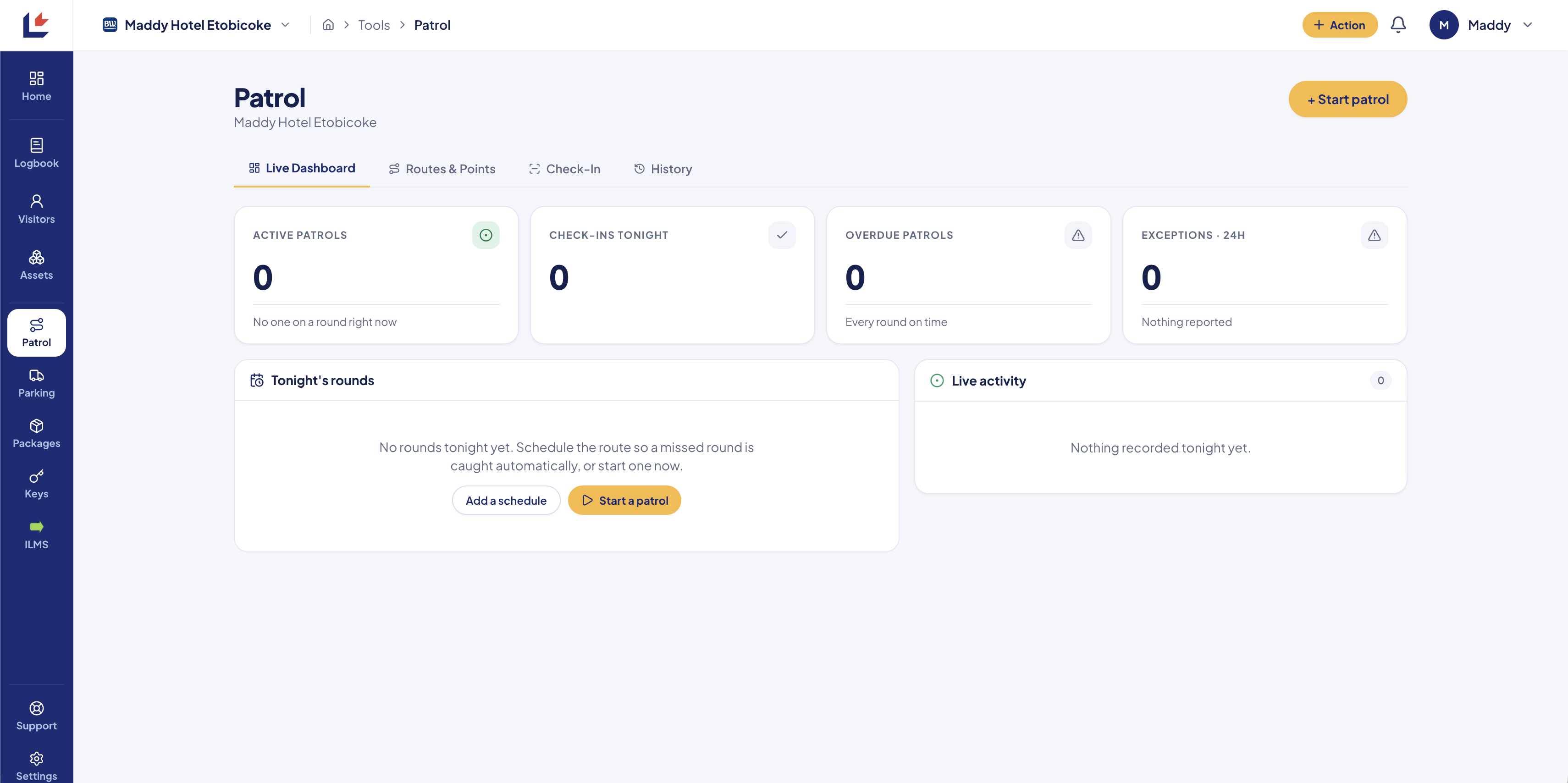
See every patrol as it happens.

Who’s out, which checkpoint they hit last, and how long ago. Overdue patrols and missed checkpoints show up straight away.
Patrolling now
Each officer, their route and their last checkpoint.
Missed checkpoints
Flagged in red the moment they’re missed.
Overdue rounds
A round taking too long shows up before it’s finished.
Live dashboard screen in LogEasy

When a round is running late, you know before the shift ends.

You don’t have to wait for a report in the morning. The dashboard shows what’s happening now.

Live activity feed
Latest patrol report
Anything logged on patrol, in one place
Patrolling now
Night shift
M. Torres · Garage route
Level 2 · 4 min ago
On track
J. Ortiz · Pool and grounds
Pool gate · 12 min ago
On track
K. Moss · Back of house
Loading dock · missed
Missed
Lobby round
Due 02:00
Overdue
Saved and time-stamped
Routes & checkpoints

Set the route once. Print the QR codes.

Build a route from the places that matter: entrances, stairwells, the garage, the pool, the loading dock. Each checkpoint gets its own QR code.

Named routes
With the time a round should take.
A QR code for every checkpoint
Made for you. Print it and put it up.
Turn routes on and off
Seasonal areas like the pool only when they’re open.
Routes & checkpoints screen in LogEasy

When a new officer starts, the route is already written down.

Nobody has to explain where to walk. The route and its checkpoints are in the app.

Entrances, stairwells, garages, pools
Hints for hard-to-find checkpoints
Active and inactive routes
Garage route
6 checkpoints · 25 minutes
Level 1 entrance
QR code ready
Active
Level 2 stairwell
QR code ready
Active
Level 3 elevator lobby
QR code ready
Active
Roof exit
Hint: behind the fire door
Active
Saved and time-stamped
Check-in

Scan the code. The stop is on record.

Officers scan each checkpoint with their own phone. If they see something, they log it right there.

Scan with any phone
No special device to buy or charge.
Saved and time-stamped
Who, where and exactly when.
Log what they see
A propped door or a broken light goes straight into the log.
Check-in screen in LogEasy

When an officer finds a propped-open door, it’s logged where they found it.

Notes written at the end of a shift miss things. A log made at the checkpoint doesn’t.

No hardware
Works on any phone
Photos with every log
Checkpoint scanned
Level 2 stairwell · 01:14
Officer
M. Torres
Scanned
Round
Garage route · 3 of 6
On track
Observation
Stairwell door propped open
Logged
Photo
1 attached
Saved
Saved and time-stamped
Patrol history

Prove the property was covered.

Every round, every checkpoint and every miss, kept and printable. Show an insurer or a lawyer exactly when each area was checked.

Completion at a glance
How many rounds were finished, and how many stops were missed.
Any night, any route
Search past patrols in seconds.
Printable reports
Ready to hand over.
Patrol history screen in LogEasy

When someone is hurt in the garage, you can show it was patrolled.

A claim often comes down to whether anyone was watching. Patrol history answers it with times and names.

Saved and time-stamped
Every change logged, every version kept
Linked to incident reports
Garage route
Last night
Round 1
22:00 · 6 of 6
Complete
Round 2
00:00 · 6 of 6
Complete
Round 3
02:00 · 5 of 6
1 missed
Round 4
04:00 · 6 of 6
Complete
Saved and time-stamped

Every module in Patrol feeds the same record.

A guest falls in a garage stairwell and says nobody was watching. By the time you open the claim, the report shows the last patrol and what they found.

Incident report #1111
Guest fall, garage stairwell, 01:30
Saved and time-stamped
LocationGarage level 2 stairwell, 01:30Core App
Officer on patrolM. Torres, garage routeLive
CheckpointLevel 2 stairwell, on the route since MarchRoutes
Last scan01:14, door propped open, photo attachedCheck-in
That night4 rounds, 23 of 24 stops scannedHistory
Witnesses1, statement signedCore App

The claim says nobody checked. Your records show an officer was there 16 minutes earlier.

Here’s how Patrol fits in.

Every property starts with the Core App. Patrol plugs into it, so a round can show up inside the same report.

Required1. Core AppYour daily log and incident reports, plus visitors, banned individuals, evidence and risk.
+
You are here2. Patrol
Live dashboardRoutes & checkpointsCheck-inPatrol history
Works on its own next to the Core App.
=
One recordEverything your team logs, saved and time-stamped in one place. Ready when an insurer or a guest asks.
1
Join the waitlist
Tell us about your property and what you want to track.
2
Tell us your routes when we launch
We set up your routes and print-ready QR codes so your first round is ready to walk.
3
Your team starts logging
On their own phones, within 14 days. No hardware to buy.
See it on a property like yours.Join the waitlist

The same night, two ways.

Without LogEasy
Paper logs filled in at the end of the shift
Missed areas nobody notices
No way to see who’s out right now
New officers guessing the route
Nothing to show when a claim lands
With LogEasy
✓Every checkpoint scanned with a time
✓Missed checkpoints flagged straight away
✓A live view of every patrol
✓Routes and QR codes set up once
✓Patrol history ready to print

Questions before you start.

Do we need special scanners?

No. Officers scan the QR codes with their own phones. Print the codes and put them up.

What if a checkpoint is missed?

It’s flagged on the live dashboard straight away, and it shows in the patrol history.

Does Patrol work on its own?

It adds to the Core App, which every property starts with. That’s what lets a patrol show up inside an incident report.

Will my officers actually use it?

If they can scan a code, they can use it. One scan per checkpoint.
